
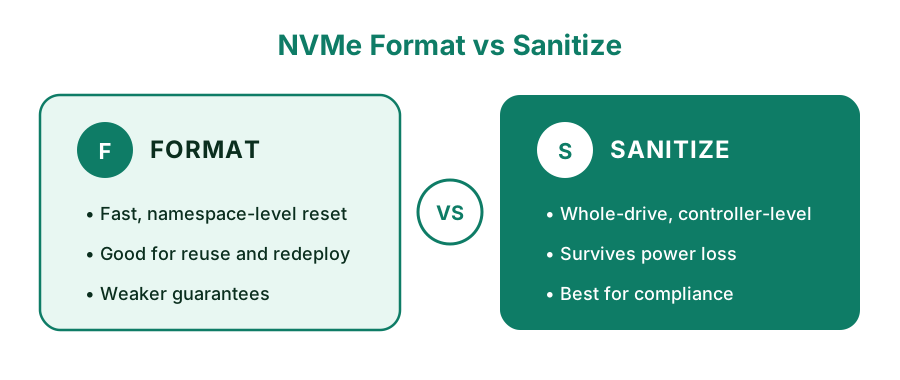
Figure 1: NVMe Format and NVMe Sanitize at a glance.
You are about to sell a laptop, return a leased server, or repurpose a workstation, and the drive inside is an NVMe SSD. You search for a way to secure erase NVMe and quickly find two different commands: nvme format and nvme sanitize.
Both sound like they wipe the drive. Both are used by system administrators. Yet they are fundamentally different in scope, resilience, and compliance. Picking the wrong command can leave recoverable residual data behind—or trap you in a hardware freeze loop.
Why Traditional Wiping & Normal Formats Fail on NVMe
When you delete a file or run a quick format in Windows, the OS only clears the partition table and file allocation pointers. The raw data remains fully intact on the NAND flash blocks.
Unlike spinning hard drives, SSDs utilize wear leveling, garbage collection, and over-provisioned hidden blocks. When classic overwriting tools write zeros to an address, the controller silently remaps the write to a different spare block, leaving the old sensitive data untouched in over-provisioned areas. True sanitization requires direct controller-level hardware commands.
1. What Is NVMe Format?
The NVMe Format command reconfigures an individual namespace (such as changing sector formatting from 512 bytes to 4096 bytes). As a side effect, it clears user data in that target namespace.
Unmaps pointers only. Data remains physically in flash cells.
Erases allocated blocks. Hidden or bad blocks may be skipped.
Destroys AES key. All ciphertext becomes permanently unreadable.
2. What Is NVMe Sanitize?
Introduced in the NVMe 1.3 specification, Sanitize is designed exclusively for permanent data destruction. Unlike format, Sanitize targets the entire NVM subsystem: all namespaces, over-provisioned spare blocks, caches, and retired bad blocks.
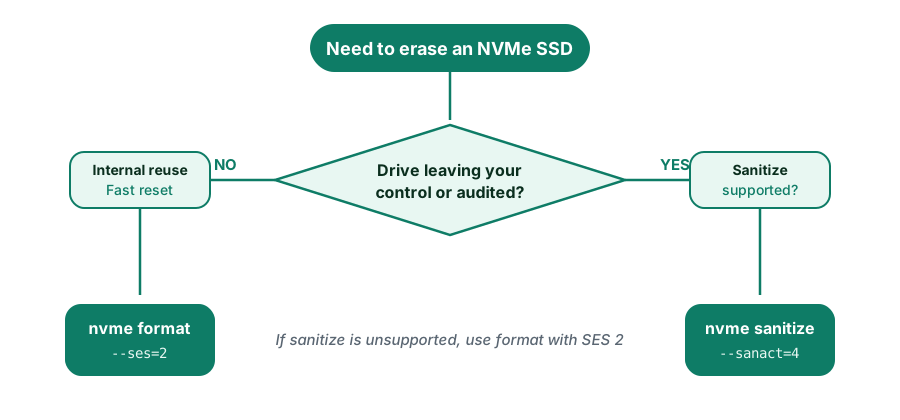
Figure 2: A simple decision flow for choosing the right erasure method.
NVMe Format vs Sanitize: Key Differences
| Feature | NVMe Format | NVMe Sanitize |
|---|---|---|
| Target Scope | Single namespace only | Entire NVM Subsystem |
| Over-provisioned & Cache | Not guaranteed | Fully Included |
| Power-Loss Resilience | Aborts with uncertain state | Resumes automatically on boot |
| NIST 800-88 Level | Clear (Purge only if SES 2 proven) | Purge (Highest Assurance) |
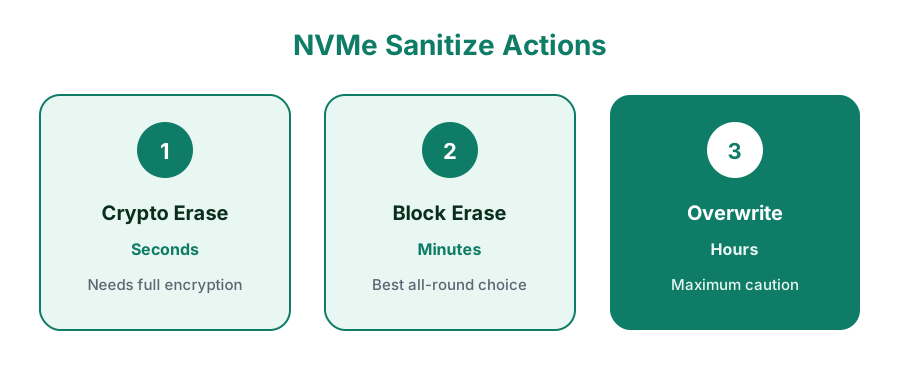
Figure 3: The three sanitize actions compared by speed and use case.
The 4 Critical Dangers of Running Manual CLI Commands
While running raw commands in a Linux terminal might seem simple, production IT and ITAD technicians regularly encounter catastrophic roadblocks:
Dell, Lenovo, and HP BIOS lock NVMe drives on boot. Running nvme sanitize returns "Command Aborted" or freezes the OS.
Linux drive identifiers (nvme0n1 vs nvme1n1) change dynamically on hot-plug. One typo permanently destroys the host system.
Terminal outputs have no digital signatures. Auditors will reject CLI logs for NIST 800-88, ISO 27001, HIPAA, and GDPR compliance.
Erasing 50+ drives across servers requires automated simultaneous wiping rather than typing terminal scripts one by one.
Eliminate CLI Risks with D-Secure Drive Eraser
D-Secure Drive Eraser provides a certified, bootable environment that automatically unfreezes locked NVMe drives, selects the optimal Sanitize/Format method, and generates tamper-proof NIST 800-88 Purge certificates.
- Automated Freeze-State Unlock: Sanitizes locked OEM NVMe SSDs seamlessly.
- Tamper-Proof Audit Certificates: Cryptographically signed PDF reports for auditors.
- High-Speed Bulk Erasure: Wipe up to 50+ drives simultaneously with zero manual scripts.
Linux CLI Commands (For Lab Testing & Verification)
If you are in a non-production lab environment and wish to test controller capabilities manually, use these reference commands:
1. Identify Controller Capabilities
# Check if sanicap is non-zero
sudo nvme id-ctrl /dev/nvme0 | grep -E "oacs|sanicap|fna"2. Execute Sanitize Command
# 4 = Crypto Erase, 2 = Block Erase
sudo nvme sanitize /dev/nvme0 --sanact=4
# Check status log
sudo nvme sanitize-log /dev/nvme0Need Audited NVMe Erasure for Enterprise or ITAD Fleets?
Don't risk compliance failures or human error with raw scripts. Deploy D-Secure across PCs, MacBooks, Servers, and Loose NVMe drives with automated NIST 800-88 reporting.
Frequently Asked Questions: NVMe Format vs Sanitize
For security, yes. Sanitize covers the entire drive (including over-provisioning and hidden blocks), survives power loss, and is officially recognized as a NIST 800-88 Purge method. Format is better for quick internal resets.
Most modern OEM motherboards (Dell, HP, Lenovo, ASUS) lock NVMe drives in a 'Hardware Frozen State' at boot. Manual Linux CLI commands fail with 'Command Aborted' or freeze the PC. D-Secure Drive Eraser automatically bypasses freeze-locks without requiring physical disconnects.
No. Terminal commands produce raw text logs that are not tamper-evident and are rejected by auditors for NIST 800-88, ISO 27001, HIPAA, and GDPR. D-Secure generates cryptographically signed, tamper-proof PDF certificates with full hardware metadata.
Cryptographic erase takes under 10 seconds regardless of drive capacity. Hardware block erase takes a few minutes. Overwrite can take several hours on multi-terabyte drives.
Windows does not include native NVMe sanitize tools. Built-in format only deletes filesystem pointers. You must boot into a dedicated sanitization environment like D-Secure's Bootable USB.
No. Cryptographic erase causes zero flash wear. Block erase adds only a single program/erase cycle, which has zero practical impact on SSD lifespan.
If the SSD lacks sanitize capabilities (sanicap=0), D-Secure automatically cascades to cryptographic format (SES 2) or verified block-level erasure with post-wipe verification.
No comments yet. Be the first to comment.